
|
|
|
|
Using Built-in File Management Operations
DiskSavvy Server provides the user with the ability to perform a number of file management operations on disk space analysis results including file copy, move, compress, compress and copy, compress and move and delete. In addition, DiskSavvy allows one execute programs, open files and start the Windows Explorer application in the current directory or in the directory where the currently selected file or directory is located in. 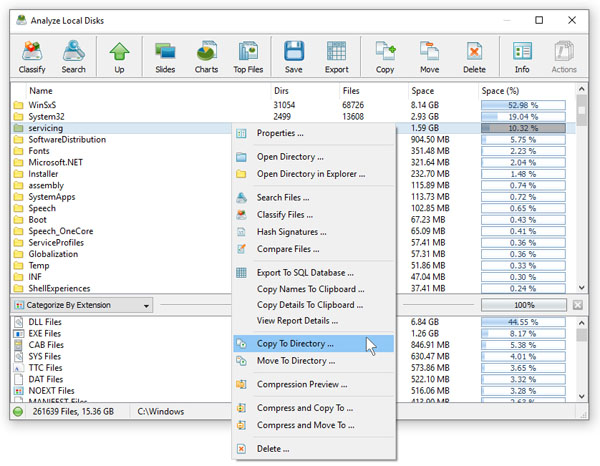
In order to copy one or more directories or files, select the required directory and/or file items in the disk space analysis results view press the right mouse button and select the 'Copy To' menu item. If a file copy operation is performed with an active file filter, DiskSavvy will copy only files matching the currently selected file filter. 
DiskSavvy provides a large number of advanced file copy options allowing one to control which types of files to copy, how fast to perform the file copy operation and how many parallel file copy threads to use. In order to open the 'Advanced Copy Options' dialog press the 'Advanced Options' button located on the 'File Copy' dialog. 
In order to delete one or more files or directories, select the required items in the disk space analysis results view, press the right mouse button and select the 'Delete' menu item. If a file delete operation is performed with an active file filter, DiskSavvy will delete only files matching the currently selected file filter. In addition, IT administrators and power computer users are provided with advanced file delete options allowing one to securely wipe data on the disk, select which types of files to delete, control the speed of the file delete operation, etc.
|
DiskSavvy News
|


