DiskSavvy Server provides the ability to analyze disk space usage for specific types of files or file categories using an extensive set of file matching
rules capable of matching files by the file name, extension, directory, file type, file size, creation, last modification or last access dates, etc.
In order to add one or more file matching rules to a disk space analysis command, open the disk space analysis command dialog, press the 'Options' button,
select the 'Rules' tab and press the 'Add Rule' button.
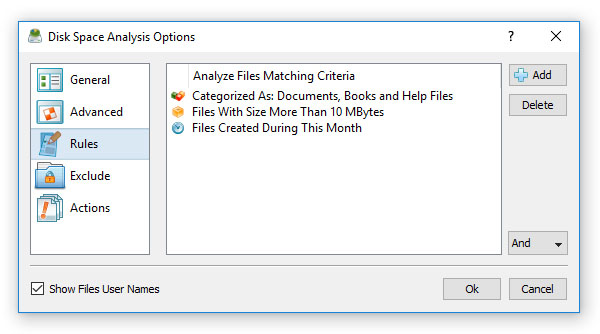
On the file matching rule dialog, select an appropriate rule type, select an operator, enter a rule value and press the 'Save' button. DiskSavvy Server
allows one to add an unlimited number of file matching rules to each disk space analysis command and apply the (AND) or (OR) logical operators. For example,
the user is provided with the ability to analyze all types of documents with the file size more than X MB that were modified during the last month.

In addition to positive file matching rules specifying which types of files to analyze, DiskSavvy Server provides negative file matching rules allowing one
to exclude specific types or groups of files from the disk space analysis process. For example, in order to exclude all types of archive and backup files from
the disk space analysis process, add a file category rule, set the rule operator to 'Not Categorized' and select the 'Archive and Backup Files' file category.


