DiskSavvy Logo

Analyzing Multiple Disks or Directories

DiskSavvy is capable of performing disk usage analysis in a number of disks, directories or network shares simultaneously. In order to analyze multiple locations, open the disk space analysis profile dialog, press the 'Add' button located on the right side of the list of analysis locations and add all the disks, directories and/or network shares that should be analyzed.
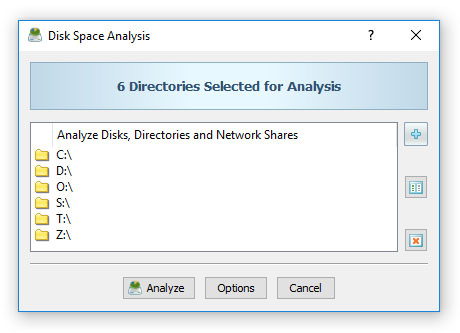
DiskSavvy Disk Space Analysis Input Directories

DiskSavvy is optimized for modern multi-CPU and multi-core systems and is capable of analyzing multiple disk, directories and/or network shares in parallel. In order to enable parallel analysis of multiple disks and directories, open the disk space analysis options dialog, select the 'Advanced' tab and specify the number of parallel processing threads to use to scan disks and directories.
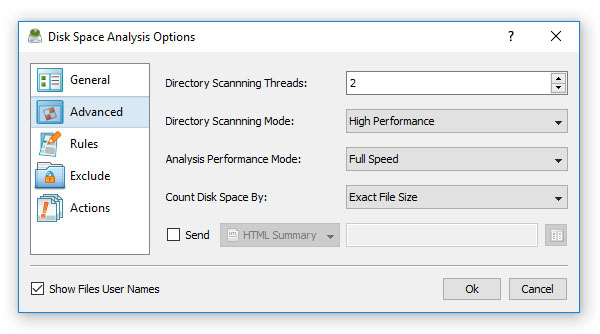
DiskSavvy Disk Space Analysis Advanced Options

DiskSavvy News

12-Apr-2026

DiskSavvy v18.0 redesigns the disk analysis results dialog, adds the ability to filter disk space analysis reports by the report ID and improves the disk space analysis reports dialog. In addition, the new version improves the JSON, CSV, text and XML disk space analysis reports, improves the DiskSavvy GUI application and fixes a number of bugs.

12-Mar-2026

DiskSavvy v17.9 adds unique disk space analysis report IDs and a hash signature of processed input directories for compliance purposes. In addition, the new product version improves the PDF and HTML disk space analysis reports, improves the performance of the disk space analysis operations, improves the DiskSavvy Server product version and fixes a number of bugs.

More News